Editor’s Note: This post is written by a member of LTV’s sponsored content team, The Leisure Explorers. Do you own a Leisure Travel Van and enjoy writing? Learn more about joining the team.
If your Leisure Travel Van has a radome on the roof, you may be one phone call away from live television—for almost nothing
At 7:47 p.m., you pull onto a back-in site in a northern Arkansas RV park. Your partner switches on the awning lights as you both start setting up in the dark, and the air carries the smell of woodsmoke from a nearby campfire.
You thumb the power button on the TV. The picture snaps on. A Detroit Tigers game, bottom of the fourth.
No captive portal. No buffering wheel. No password for the streaming service you signed up for in February and forgot. The signal just appears—the way your grandparents watched television, except this antenna tracked a satellite 22,236 miles overhead the entire time you were driving. Live TV was waiting for you to finish unhooking your toad — if you have one.
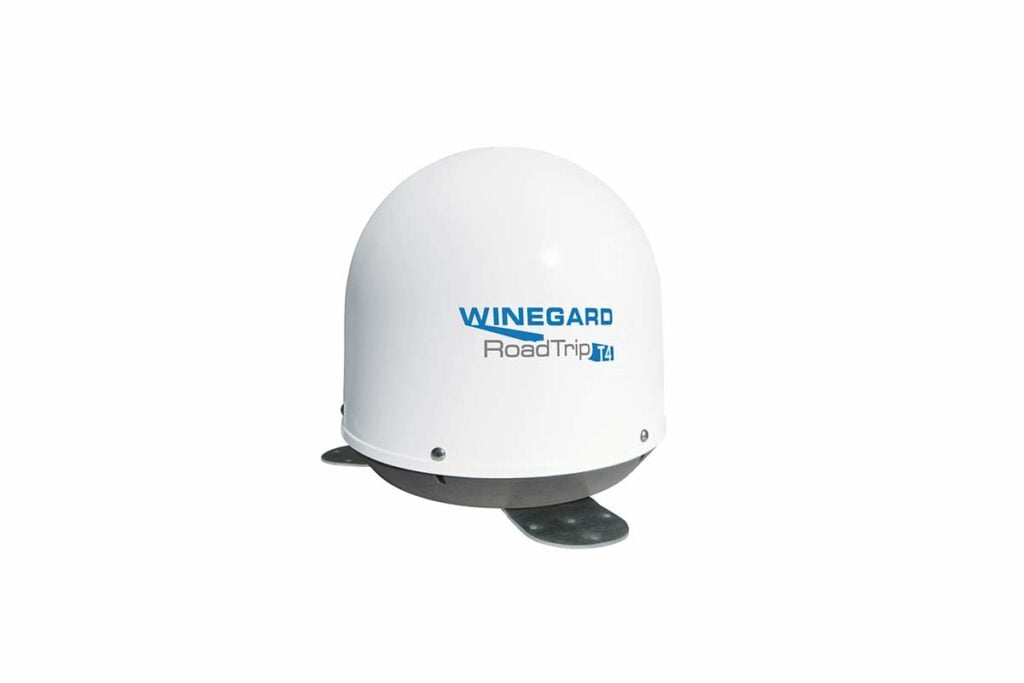
That antenna is the Winegard RoadTrip T4. It may already be sitting on your roof, inactivated, right now.
The Antenna You May Have Forgotten You Own
For years, the Winegard RoadTrip T4 shipped as a factory option on Leisure Travel Vans built by Triple E RV in Winkler, Manitoba. Triple E installed this antenna on roughly 40 percent of new LTVs—Unity, Wonder, and Serenity—rolling off the line during those years. LTV charges $2,495 for the factory install; the same antenna runs about $2,150 online without installation.
If your LTV has one, you have already paid for it. Many owners never activate it. The antenna sits under its 14-inch plastic dome on the roof.
Check the roof on your LTV. If you see a white or black dome about the size of a deep, round, cylindrical salad bowl, you have a T4 on the roof of your LTV
The $3.47 Math
We pay DISH $115 a month for service at our house. Adding a second receiver for the LTV costs us $3.47 a month—a slight discount off the standard $5 add-on rate. That is not a typo. $3.47.
For that, we receive every channel from our home DISH package: live sports, local news, national weather, movies—delivered the moment we park. No data used on our Wi-Fi plan, and no password to remember.
Now consider what streaming the same programming costs on your Wi-Fi, Starlink, or cellular data plan.
- A single baseball game in HD uses 3-7 gigabytes.
- A two-hour movie runs 4-6 gigabytes.
- An evening of news, weather, and a ballgame? Roughly 8 to 10 gigabytes before bedtime.
- A week in the campground: 50 to 70 gigabytes gone to entertainment alone.
Cellular RV plans throttle—they slow your connection dramatically—after you use up the set number of gigabytes of high-speed data on your plan per month. Fifty to seventy gigabytes on TV can use up your entire month’s high-speed data plan allowance in one week. Even Starlink’s Roam service, which handles volume better, gives you every gigabyte the T4 would have handled for free.
Because the T4 handles live TV, we use a lower-cost Starlink plan that costs $50 a month for 100 GB of data. Our monthly costs? $50 + $3.47 a month. That’s a lot less than the $165 a month for the unlimited Starlink plan.
We spend $50 a month on Starlink and $3.47 on DISH in our LTV. The T4 makes the lower cost Starlink plan work for us
What the T4 Does That Starlink Cannot
The most common question we hear: Why pay for satellite TV when I already pay for Starlink or a cellular router? The answer is that they do different jobs.
Starlink sends Internet to your van. It stores your email, video calls, weather downloads, and web browsing history. It works in both directions—you send and receive.
The T4 does something different. It receives a one-way TV broadcast directly from a satellite. No internet involved. No data consumed. The two systems do not compete; they complement each other. Starlink handles the internet. The T4 handles television. Run both at the same time, and each does what it does best.
One more advantage worth knowing: at crowded rallies and busy campgrounds, Internet signals get congested. Thousands of rigs all pulling down Starlink or cellular at once can slow everyone’s connection. The T4 satellite TV signal is unaffected. It comes from 22,000 miles up and does not share bandwidth with your neighbors.
A Signal Ready Before You Finish Parking
Most RV satellite dishes require setup after you park—level the coach, extend the dish, and wait for it to search the sky. For owners of Class A motorhomes or fifth wheels, a tripod-mounted ground-mounted dish is standard practice. It works, but it adds time and steps to the end of an already long travel day.
The T4 works differently. A motor inside the dome continuously adjusts the dish as you drive — turning as you round a curve, correcting as the road climbs or descends. The antenna tracks the satellite the entire trip. When you arrive at your site, the T4 already has a lock. Press the power button on the coach TV, and the picture appears.
After a long day of driving, that matters. The awning, the leveling blocks, the slide-out, power, water, sewer—the list already runs long. The T4 removes one item from it entirely.
A note: tree tunnels, mountain canyons, and tall buildings can interrupt the signal briefly while you drive. On an open interstate, the T4 holds solid, and trees at your campsite are often less of a problem than you expect—as we write this, we are sitting under a canopy of trees in a smothering downpour at a rally in Mountain View, Arkansas, with a clear signal.
But remember, obstructions block or slow Starlink and cellular Wi-Fi signals too.
A Note for Canadian LTV Owners
If you live in Canada, your situation differs from that of US owners in important ways. Read this section before proceeding.
DISH and DIRECTV are US-only services. Canadian LTV owners use Bell TV, which offers full standard and high-definition service across Canada. The T4 is compatible with Bell TV and works well for Canadian owners traveling within Canada.
The catch: Bell has significantly reduced the area of the United States where its signal reaches. Canadians who winter in Arizona, Florida, or other southern states may find the Bell signal weak or absent south of the border. Before activating Bell TV for your LTV, call Bell and describe your travel region. Ask specifically whether their signal covers the area where you spend most of your time.
Shaw Direct, another Canadian provider, is not compatible with the T4 at all. If Shaw is your current home provider, the T4 cannot receive their satellite signal.
Neither DISH, DIRECTV, Bell TV, nor Shaw Direct works in Mexico. Extended travel south of the US border requires Starlink’s unlimited service plan for both internet and entertainment.
Getting Started: Call DISH Outdoors
Standard DISH customer service cannot help you set up satellite TV in an RV. If you call the main DISH line and ask about your van, you will be transferred several times and likely get nowhere. Ask specifically for DISH Outdoors. It is a separate department with representatives trained on RV and mobile setups.
If you already have DISH at home: Adding a second receiver for the LTV is the simplest path. Your existing home subscription covers all the same channels in your van. The monthly add-on is $5.00, or slightly less with a discount. You will need a DISH Wally receiver—a small box with an HDMI cable that connects to your coach TV. Ask DISH Outdoors to send you a Wally.
If you do not have DISH at home: The Pay as You Go plan starts at about $58 per month for 30 days of service. No activation fee. No contract. No penalty for stopping. You can suspend service in October and restart in May. For seasonal travelers, this flexibility is valuable.
One important hardware detail: older DISH Hopper-series receivers—the larger boxes with multiple tuners do not work well with automatic dome antennas like the T4. When you call DISH Outdoors, ask specifically for the Wally receiver. The Wally is small, uses an HDMI cable, and has a remote that works through walls and cabinet doors.
The initial activation call can take more than 30 minutes. Set aside time on a relaxed afternoon. Once it works, it keeps working.
The Setup: One Call First, One Climb After
The T4 ships from the factory configured for DIRECTV. This is an artifact from earlier years. DIRECTV does not work well with the T4. DIRECTV moved its high-definition channels to satellites that the T4 cannot receive.
If you subscribe to DISH, the antenna will not find the right satellites until you adjust a small set of DIP switches inside the dome. This is a 20-minute project—but call Winegard first.
Call Winegard at 1-800-788-4417 before you climb the ladder. Have three things ready: your home ZIP code, your primary travel region (Southeast, Southwest, full country, etc.), and your receiver model number. The technician will tell you exactly which switch settings to use for your geography. One phone call prevents three trips up the ladder.
One note on DISH satellites: DISH has been shifting channels from its Eastern Arc satellite to the Western Arc satellite in recent years. The Eastern Arc satellite is aging, and DISH continues moving programming off it. Winegard’s own technician pointed us toward a hybrid setting that now holds solid from Maine to Florida and west to the Mississippi. Ask the Winegard tech specifically about this — do not rely on the printed manual alone.
When you do climb to the roof:
- Park on level ground under open sky. Turn off antenna power.
- Bring a Phillips #2 screwdriver and a 3/8-inch socket wrench.
- Remove the six screws and lift the dome straight up — go slowly to avoid tearing the rubber gasket underneath.
- Find the DIP switch bank in the electronics box. Flip the switches to the settings the Winegard technician gave you. A toothpick or pen tip works well.
- While the dome is off, inspect the sealant around the three mounting feet. If the sealant is cracked or peeling — UV exposure does this in five to seven years — apply fresh self-leveling lap sealant before replacing the dome. A tube costs about $8 and prevents a roof leak that can cost thousands to repair.
- Replace the dome, tighten the screws, and descend.
Power the antenna back on. It will search for the satellite for several minutes. Some owners panic after 90 seconds and assume something went wrong. It did not. Let the antenna search. If it never locks on, one of the switches is likely set incorrectly — call Winegard again before climbing back up.
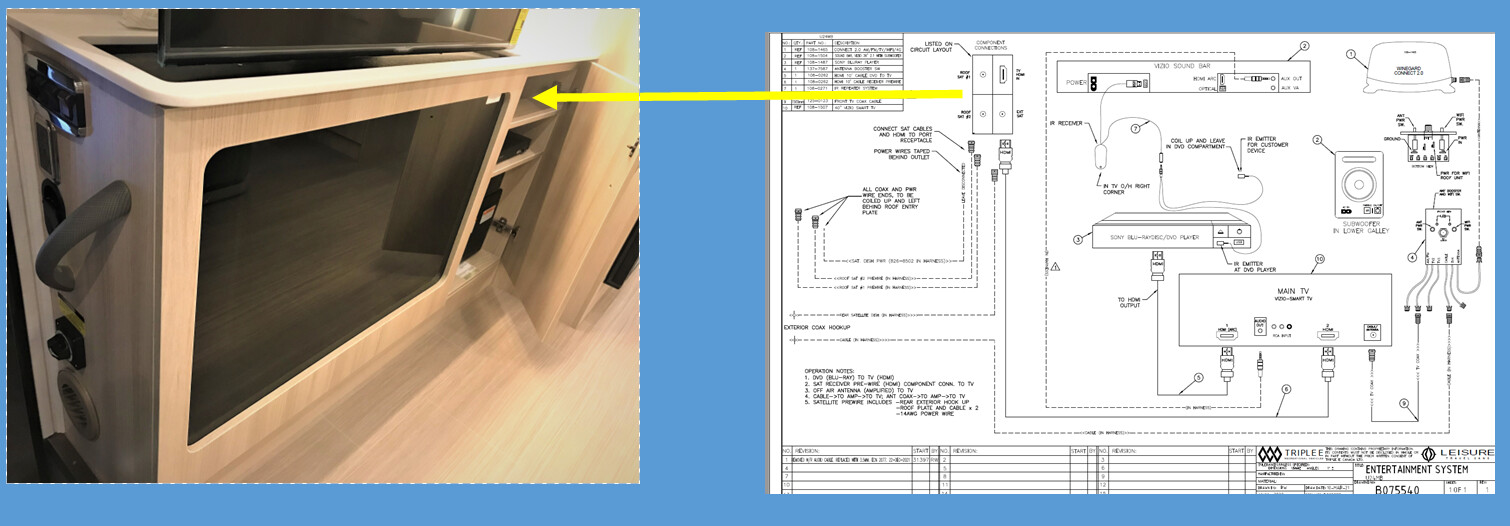
Note: Many LTVs are pre-wired for satellite TV. So even if the antenna is not on the roof of your LTV, installation is straightforward—no wires to run. You’ll find SAT 1 and SAT 2 ports in a cabinet next to your TV receptacle box in the case of Murphy Bed models. For other models, check areas in cabinets close to your TV. It’s there; you’ll have to hunt for it. LTV does a good job of putting these ports out-of-the-way, and it’s in this spot that you’ll connect your receiver to the SAT ports.
Tradeoffs to Know Before You Decide
Heavy rain and thick snow. Heavy thunderstorms can knock out satellite TV reception, even though it didn’t knock us offline in the Ozarks as we were writing this story. DISH operates on Ku-band frequencies, which handle rain better than DIRECTV’s Ka-band frequencies, but neither is immune to rain. A practical workaround: park so the dome has a clear view of the southern sky, even if that means an awkward angle on the site. Thick snow sitting on the dome itself can block the signal until you clear it off.
Tree cover. Heavy tree canopy directly overhead can block the signal. The T4 keeps searching until it finds a lock, but if obstructions block the line of sight, it may never find a signal. In practice, many campsite trees are not tall enough to block the southern sky—our experience with Ozark trees is that the signal holds without fail. But owners who camp exclusively in dense forests should carefully consider whether satellite TV is the right fit. Neither Starlink nor satellite TV services will work at all, or at all well, when obstructions block signals.
Power consumption. The T4 antenna itself draws very little power once it has acquired a satellite lock—the motor runs only briefly to correct tracking. The Wally receiver draws about 8 watts, roughly 1.1 amps at 12 volts. Four hours of evening television while boondocking costs about 4 to 5 amp-hours from your house battery. That is trivial with a lithium battery bank of 200 amp-hours or more. On a 100-amp-hour lead-acid setup, it is noticeable but manageable. One quirk: if you cut power to the Wally completely, it loses its satellite lock and takes about 10 minutes to re-acquire it when you turn it back on. If you want instant TV in the morning, leave the Wally on standby overnight.
DIRECTV does not work well with the T4. This is worth stating plainly. DIRECTV moved its high-definition channels to satellites that the T4 cannot receive. The T4 receives DIRECTV in standard definition only—the older, lower-quality picture. If DIRECTV HD is what you want, the T4 is the wrong hardware. You would need a different antenna, such as the Winegard Traveler, at roughly $1,600 installed.
Roof space. The T4 occupies a 14-inch footprint on your roof—space that might otherwise hold a solar panel. For owners adding lithium batteries and planning 400 to 600 watts of solar, that geometry matters. It is a tradeoff to consider depending on your needs.
Should You Activate? A Simple Guide
Activate the T4 if most of these describe you:
- You already pay for DISH at home—adding the LTV receiver costs $3.47-$5.00 per month.
- You want to add DISH without a home subscription for $58 per month.
- You travel more than a few weeks a year.
- You watch live sports, news, or weather while on the road.
- You would rather not burn Starlink or cellular data on video streaming.
- You camp frequently in open or semi-open sites with a view of the southern sky.
You can comfortably skip it if:
- You cut the cord years ago and have no interest in live TV.
- You camp almost exclusively under a heavy tree canopy.
- Your travel takes you regularly to Canada, Mexico, or other areas outside DISH’s coverage.
- You watch almost everything on demand through streaming services and do not care about live channels or burning up Wi-Fi bandwidth.
If You Are Shopping for a 2027 Leisure Travel Van
Triple E RV is dropping the T4 as a factory install option starting with the 2027 model year. Streaming services have become so common—Starlink, cellular routers, Netflix over Wi-Fi — that most new buyers no longer ask for a satellite TV antenna.
That means two things. First, if you are shopping for a new LTV and want the T4, the remainder of the 2026 model year is your last chance to order it with a new factory install. Second, and more importantly for owners who already have one: you are sitting on a piece of equipment that is about to become harder to replace. Activating it now costs almost nothing.
Since the T4 is no longer an option on offer for the 2027-year LTV’s, here are the main alternatives if you decide you want satellite TV services.
Winegard Pathway X2 ($400–$600): A portable DISH-compatible antenna that sets up on the ground in about 15 minutes. Automatically handles Eastern and Western Arc satellites. You can move it around campsite areas to escape tree cover—something a roof-mounted dome cannot do. Owners who have used both generally prefer the Pathway for tree-heavy camping.
Winegard Traveler SK-SWM3 (around $1,600 installed): The roof-mount alternative for DIRECTV HD. If DIRECTV is your provider and picture quality matters, this is the rooftop answer.
Skip satellite TV entirely: Many 2027 buyers will choose Starlink plus a small over-the-air antenna for local broadcast channels. They’ll accept the data trade-off because streaming flexibility matters more than a fixed-cost live channel lineup. Neither path is wrong — they are just different math.
Reminder: Most LTVs are pre-wired for satellite TV. So even if the antenna is not on the roof of your LTV, installation is straightforward—no wires to run. You’ll find SAT 1 and SAT 2 ports in a cabinet next to your TV receptacle box in the case of Murphy Bed models. For other models, check the areas in the cabinets near your TV. It’s there; you’ll have to hunt for it. LTV does a good job of putting these ports out-of-the-way.
The Small, Silent Thing That Does Not Happen
The T4 leaves the Leisure Travel Vans option lineup after 2026. For owners of new LTVs, it will simply not be available. For owners who already have one on the roof, the math remains the same as it has always been.
Call DISH Outdoors. Order a Wally receiver. Call Winegard and get your DIP switch settings. Make one trip up the ladder. Pay $3.47 a month or whatever the fee is for you and your circumstances.
Then pull into your next campsite at dusk. Switch on the awning lights. Press the power button on the coach TV.
Listen for the small, silent thing that does not happen: no buffering, no login, no fumbling for a password. No six-inning rally turning into a spinning wheel. The picture is already there — it has been tracking across the sky with you all day, waiting for you to stop and watch.
We spend $50 a month on Starlink and $3.47 on DISH in our LTV. If you have the T4 on the roof of your RV, the antenna provides you the option to do what we do
Note: Learn how to set up and use the other Winegard antenna on the roof of your LTV, the Connect 2.0+ antenna. You’ll find that story here.
Note: Service pricing, satellite arc availability, and provider coverage areas change over time. Confirm current pricing and coverage with DISH Outdoors (U.S.) or Bell TV (Canada) before activating service. Winegard technical support: 1-800-788-4417.
Acknowledgements
These authors thank Dean Corrigal, LTV Sales, Shania Bueckert, LTV Marketing, and Brian Hiebert, LTV Customer Service, for their assistance in uncovering and verifying facts for this story.
This is a companion discussion topic for the original entry at https://leisurevans.com/blog/discover-the-not-so-hidden-secret-that-may-be-on-your-ltv-roof/